 E-PMS
E-PMS
E-PMS - Planned Maintenance System for Ships
Offline on board. Connected ashore. Evidence-grade by design.
Sealogic E-PMS is a planned maintenance system for ships. It keeps equipment, maintenance jobs, running hours, spare parts, purchasing, risk assessments, certificates and dry-dock planning in one system that runs on board with no internet connection and syncs with the office automatically. Every completed job is a locked, evidence-grade record. E-PMS works standalone, and works better together with E-CMS, Sealogic's crew management system.
Built by the team behind E-CMS, which runs a managed fleet of 55 vessels and over 3,300 seafarers in production today. The product is new; the platform and the people are not.
Why E-PMS
A planned maintenance system built for the way ships actually operate
Ships spend most of their time without a usable connection, crews change every few months, and auditors want evidence rather than good intentions. E-PMS is designed around those three facts.
Offline first, synced always
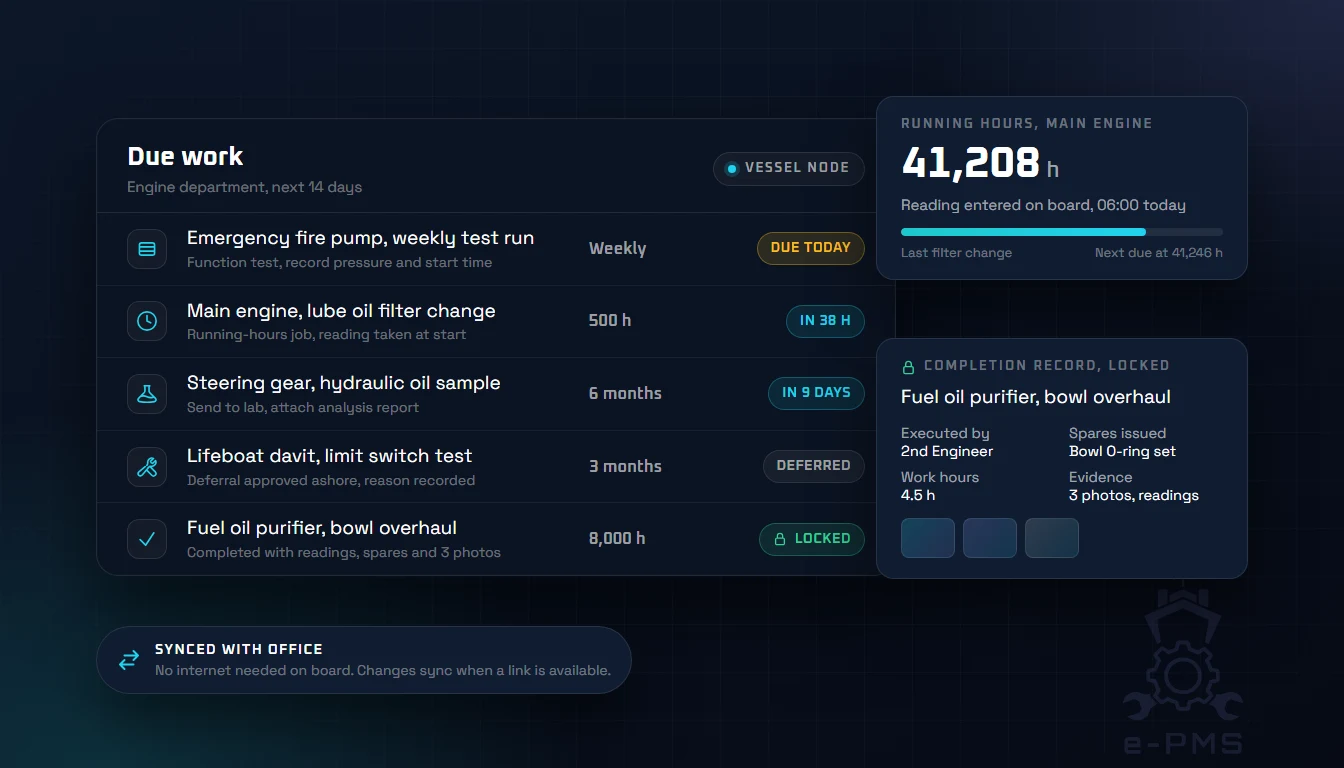
Every vessel runs its own E-PMS node. Nothing on board waits for a link; everything syncs with the office automatically when one is available.
Evidence, not edits
Completed jobs, stock movements and approved risk assessments are locked records. Corrections are new records with a reason, so history always tells the truth.
Author once, install fleet-wide
Equipment types, jobs, spares and manuals live in one fleet registry. Install them on any vessel, inherit a sister ship, and roll out changes everywhere.
No training required
Every screen has a built-in interactive guide that walks a new crew member through the real buttons on that page, plus a full help centre on board.
How it works
One system, two nodes: the ship and the office
E-PMS is deployed as an on-board vessel node and an office node for the fleet. The interface is the same on both. Each side records what happens where it happens, and the other side receives it on the next exchange.
On board
Vessel node, no internet needed
- Log running hours per unit or as a whole engine-room round
- Start, suspend and complete work orders with readings, spares and photos
- Draw spares from lockers, count stock, stow deliveries
- Raise requisitions and department orders, sign off on board
- Prepare risk assessments and confirm toolbox talks
- Nominate dry-dock items and follow the office decision
- Propose registry changes and see the office answer
Ashore
Office node, whole fleet
- Author the fleet equipment registry, jobs, spares and manuals once
- Install equipment on vessels, migrate with last-known service dates
- Approve job starts and purchase orders across the fleet from one screen
- Tender dry-dock scope to yards, compare structured offers, award
- Track certificates, class surveys and conditions of class
- Review change requests and management-of-change records
- Run fleet analytics and produce reports for owners and class
Documents cross poor links
Manuals, certificate scans and photos travel with the data. Interrupted downloads resume where they stopped, and photos are compressed for satellite links.
If the ship server is down
Crew sign in on the office address with the same credentials and keep working, locked to their vessel. The ship pulls everything down when it recovers.
Vessels update themselves
Updates install while the vessel is idle, or immediately when the Master chooses. A ship that is behind keeps working and catches up on its next exchange.
Platform, security and scale
Built to run a fleet, not a pilot
Each operator runs E-PMS on its own isolated deployment, sized for the whole fleet, backed up automatically and connected to every vessel over a sync channel designed for intermittent satellite links.
Single-tenant architecture
Every operator gets a dedicated deployment with its own application and database. Your fleet data is never co-mingled with another company's, which is a clean answer for security reviews and vetting.
Bank-grade security
Encrypted connections everywhere, per-user accounts with role-based permissions and no shared vessel password, single sign-on ashore, and a full audit trail behind every record.
Scales past 1,000 vessels
The office node scales horizontally. A deployment grows from one ship to more than a thousand without a drop in responsiveness, and adding a vessel is an enrolment, not a migration.
Automatic backups and fallback servers
Office data is backed up automatically, and standby servers take over if the primary fails. Every vessel's records are also mirrored ashore by sync, and crews can work on the office address if the ship server is down.
Sync designed for satellite links
Exchanges are acknowledged and resumable, like a reliable transport: only what changed travels, nothing is sent twice, and a dropped link continues from where it stopped. Not traffic greedy, and built for connections that come and go.
Automatic and manual sync
The vessel exchanges data on its own whenever a link is up. Anyone with sync rights can press Sync now to force an immediate exchange, and the footer on every screen shows the link's health and what is pending.
Auto updates with hot-swap versions
A new version downloads in the background and is staged next to the running one. The vessel swaps to it while idle, or immediately when the Master chooses, with a short maintenance screen and no reinstall. If a swap cannot start, the vessel lifts the screen by itself.
Fleet-wide version control
The office rolls a version out; vessels pick it up on their own schedule. A ship that is behind keeps working and pauses receiving until it has updated, so office and ship never disagree about the data they exchange.
Modules
Every module below runs on the vessel without a connection and on the office node for the fleet. Open one for the workflow, who can do what, and how it syncs.
Maintenance
The core of the system: what to do, when, on which equipment, and the proof it was done.
Vessel Dashboard & Maintenance Calendar
An equipment tree that scopes the due-work list, condition trends and spares, with a month, week and day calendar of the same work.
Learn moreWork Orders & Evidence Records
Start, perform and close maintenance jobs with executors, readings, running hours, spares and photos, as locked evidence-grade records.
Learn moreRunning Hours & Condition Readings
Log running hours per unit or as a rounds sheet, with plausibility checks, due-date forecasting and an auditable history.
Learn moreFleet Equipment Registry
Author equipment types, jobs, spares and manuals once in a fleet master catalogue, then install them on any vessel.
Learn moreSupply
One chain from a spare drawn on a job to a delivery stowed in a locker, for engine stores and the galley alike.
Spare Parts & Stock Control
A per-locker, append-only ledger of every spare on board, with transfers, stocktakes, inventories and below-minimum alerts.
Learn moreProcurement & Requisitions
Turn demand into stock on board: requisitions and department orders through board sign-off, office approval, purchase, delivery and stow.
Learn moreProvisions & Catering Stores
Food and beverage stock in dated batches, coloured by expiry, ordered through the same pipeline and disposed of with a recorded waste value.
Learn moreSafety & Compliance
The controls that gate the work and the records that class, flag and vetting ask to see.
Risk Assessments & Work Permits
Prepare, score and approve risk assessments on a 5x5 matrix, reuse them as a library and gate flagged jobs behind a valid one.
Learn moreCertificates & Class Surveys
Class and statutory certificates with expiry and survey windows, conditions of class and survey items linked to equipment, synced to the ship.
Learn moreFleet & Projects
Office-side views across every vessel: docking projects and the numbers behind management review.
Dry-Dock Planning & Yard Tendering
Nominate docking scope on board, tender it to shipyards by RFQ, compare structured offers side by side and plan the docking against the class window.
Learn moreFleet Analytics & Reports
Fleet-wide completion, backlog and overdue trends by vessel and system, corrective ratios and reports for owners, class and management review.
Learn morePlatform
What every module above runs on: the vessel node, the sync channel and the update mechanism.
Offline Vessel Node & Automatic Sync
Each vessel runs its own E-PMS node that works fully offline and exchanges data with the office whenever the link is up.
Learn moreSee E-PMS run a vessel offline and your fleet ashore.
-
Proven platform
Built by the team behind E-CMS
Same platform and same people as E-CMS, which runs a managed fleet of 55 vessels and over 3,300 seafarers in production today.
-
December 2026
First commissioning
Go-live date agreed with the first client fleet, ship and office.
-
Now
Dry-Dock module in active development
Docking project management is being extended ahead of the first commissioning.
Standalone or with E-CMS
Complete on its own. Better with crewing connected.
E-PMS is a full planned maintenance system standalone. Run it together with E-CMS, Sealogic's crew management system, and the two share the people, so nothing is keyed twice between the crewing and technical departments.
| Area | E-PMS standalone | E-PMS with E-CMS |
|---|---|---|
| User provisioning | The office creates crew and office accounts and curates the rank vocabulary in E-PMS. | Crew accounts, ranks and departments flow from E-CMS. A sign-on ashore grants vessel access; a sign-off revokes it automatically. |
| Job execution | Executors are picked from the vessel's E-PMS crew list and frozen onto the completed record. | The executors offered are the crew actually on board, by rank and department, with the same identities crewing holds. |
| Work hours | Each work order times the work of its executors and banks the hours on the record. | Hours worked on maintenance are exchanged with E-CMS rest-hours records, so nothing is re-keyed from memory. |
| Sign-in | Per-user accounts on ship and office; Microsoft single sign-on available ashore. | One Sealogic sign-on across E-CMS and E-PMS for office users. |
| Superintendent fleets | Assign each superintendent the ships they are responsible for; every list narrows to that fleet. | Inherit the assignment from the vessels E-CMS lists the person on, then adjust by hand if needed. |
Designed to produce the evidence auditors ask for
E-PMS does not replace your management system. It generates the maintenance evidence that TMSA, SIRE 2.0, ISM and class expect, as a by-product of doing the work.
| Framework | Expectation | What E-PMS records |
|---|---|---|
| TMSA 3 Element 4 | Reliability and maintenance standards | Critical equipment flagged and reported separately, a recorded basis for every interval, calendar and running-hours scheduling, deferrals with reason and approval, spares tied to equipment with minimum-stock alerts, breakdowns with root cause |
| TMSA 3 Element 7 | Management of change | A strategy change on a critical job raises a management-of-change record instead of saving silently; a MOC register with linked risk assessments |
| TMSA 3 Element 8 | Incident reporting and analysis | Breakdown work orders with root-cause category; fleet-wide grouping of failures by equipment type across sister vessels |
| TMSA 3 Element 11 | Emergency preparedness | Statutory function tests scheduled as jobs with readings and completion evidence |
| TMSA 3 Element 12 | Measurement, analysis and improvement | Fleet analytics: completion, backlog, overdue by criticality, corrective ratio, trends per vessel and system |
| SIRE 2.0 / ISM Code | Planned maintenance and evidence of implementation | Locked completion records with executors, readings, spares and photos; evidence pack per equipment; certificate and survey status on the work list |
E-PMS is a tool for producing evidence. It is not a certification and does not replace class, flag or vetting approval.
Dry-Dock: from nominated scope to an awarded yard
The Dry-Dock module runs a docking as a project: the crew nominate items, the office approves them, tenders the scope to shipyards, compares the offers and plans the docking against the class survey window. Its project-management side is the current focus of work ahead of the first commissioning.
Dry-Dock planning in detail-
1
Nominate
Anyone aboard adds docking items, directly or from the equipment tree. The office approves or declines each with a reason the crew can see.
-
2
Tender
Shortlist yards on a map or by port, country and dock size. One RFQ per yard carries the approved items to an online quote form.
-
3
Compare and award
Structured offers side by side: cheapest total first, cheapest per line highlighted, budget variance, docking window and validity.
-
4
Plan
A timeline of dockings and in-water surveys against the regulatory due window. Completing a docking closes the hull-inspection work and raises the next cycle.
Early-adopter programme
The first partner is contracted. Seats are still open.
E-PMS is built with the industry rather than for it. A limited number of R&D partner seats remain for shipowners and managers who want a system shaped around how they actually work. Here is where the programme stands.
-
July 2026
Kick-off workshop
Real maintenance workflows mapped against the system with the contracted clients.
-
September 2026
Working system demonstrated
Shown ship-to-office to the first client fleet.
-
December 2026
First commissioning
Agreed go-live with the first client fleet; Dry-Dock project management extended ahead of it.
What you get
- A PMS harmonised with your existing workflows before it goes live
- A working system to evaluate now, not a slide deck
- A reasonable discount in exchange for your involvement
What we get
- Your expertise and your view on the same problems from a different angle
- A partner already familiar with the system by the time we reach deployment
Who qualifies
vessels in fleet
years in operation
If this fits your organisation, write to info@sealogic.eu or request a demo.
Request a DemoPlanned Maintenance System FAQs
What is a planned maintenance system (PMS) for ships?
Does E-PMS work without an internet connection on board?
Can E-PMS run standalone, without E-CMS?
What is the current status of E-PMS?
How does E-PMS help with TMSA, SIRE 2.0 and ISM audits?
How are spare parts and purchasing handled?
How is a new vessel brought onto E-PMS?
How are software updates delivered to vessels?
Is E-PMS single-tenant, and how is the data secured?
How many vessels can one E-PMS deployment handle?
How much satellite bandwidth does E-PMS use?
Who is E-PMS for?
What happens to the data when a ship is sold or leaves the fleet?
How does E-PMS keep maintenance records auditable?
Can I still join the E-PMS early-adopter programme?
Ready to Put Maintenance on One System?
See Sealogic E-PMS run a vessel offline and a fleet ashore: work orders, running hours, spares, procurement, risk and dry-dock planning in one place.